How do I replace spreadsheet route planning? A 1-day switch plan
Updated
Short answer
You can switch in one working day without dropping your spreadsheet: import today’s orders from it, check the addresses, add your drivers and shifts, plan the day, compare the result with your usual routes, then send the routes to your drivers. Keep the sheet running alongside for the first week and keep your export. In DayRoute the import shows how every date was read before anything is saved.
How it works in DayRoute
Signs the sheet has hit its limit
A spreadsheet plan works until the third driver or the first late order. None of these signs is a fault of the spreadsheet; they are the limit of keeping every rule in one person’s head.
- One driver calls in sick and you rebuild the plan by hand
- You find out a stop breaks its window only when the customer calls
- The routes live in one person’s head, and that person is on vacation next week
- Drivers get the plan as a screenshot or a text, and ask what changed
Morning: bring in today’s orders and check them
DayRoute is route planning and delivery management software for local delivery teams, made by EzOps. Paste rows from Excel or Google Sheets, or drop your .xlsx or CSV file; you do not retype anything. Your own column names are matched (English, Spanish, Vietnamese and Swedish names), and a column you match yourself is remembered in this browser.
- The preview shows how every date was read: month first for US companies, with dates that could be read two ways flagged before you import (the answer on importing orders from Excel or CSV has the detail)
- An order imported twice is updated, not doubled
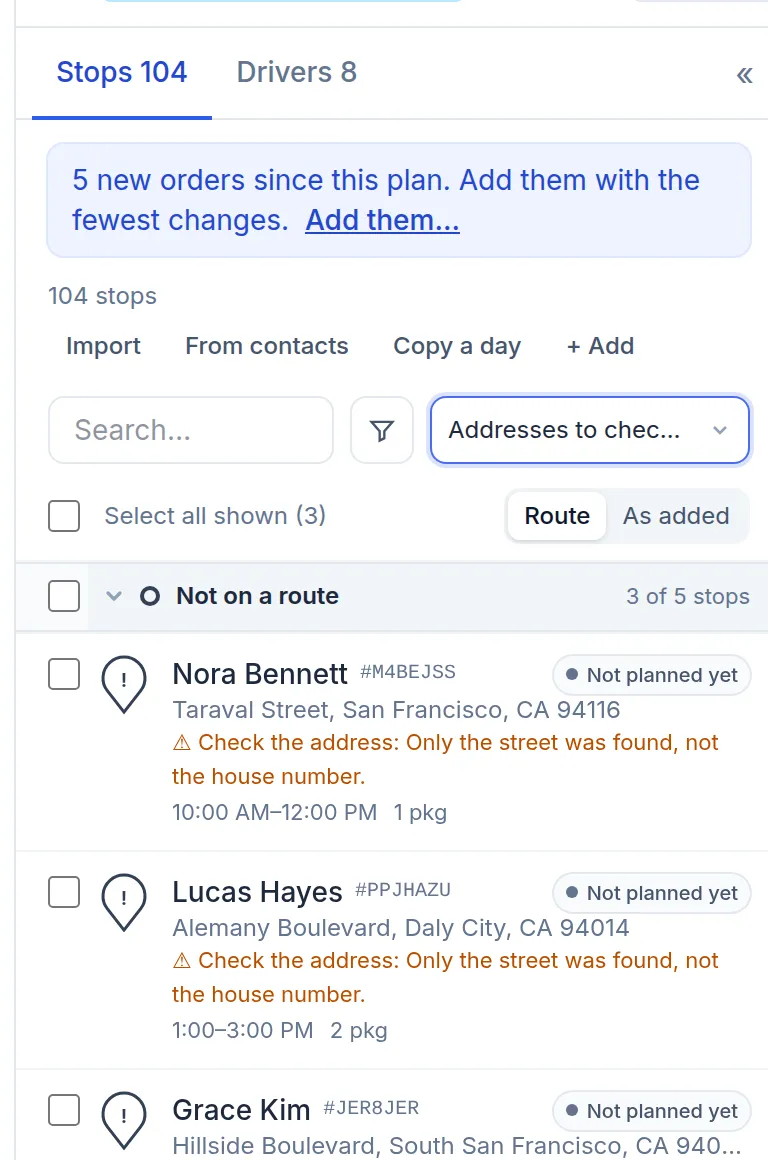
- Vague addresses are flagged in the stop list, for example “Only the street was found, not the house number”, so you fix them before a driver gets lost; the warning stays on the stop until you do
- No orders at hand to practice? On an empty day a button adds 24 sample stops near your depot
Plan, run beside the sheet, then send
Add your drivers with their shifts (up to four breaks each), capacity and skills, and let windows and service times ride on the orders. Plan routes plans every driver at once, and a stop left off the routes comes with a plain-English reason. Then compare with your own routes: windows hit, total miles, stops that did not fit. Edit by hand where you know better: stops can be dragged between drivers. Before the first real send, use “Send me a test delivery” to see what your customer and your driver see.
- Drivers open the route in the DayRoute Driver app on Android or iPhone, or from a text-message link with no install
- Run the sheet in parallel for the first week; switch off the spreadsheet when the routes agree with your judgment
- Keep your export: analytics export to Excel, and after the free trial your data stays and can be viewed and exported
What does not carry over
A standing weekly list does not have to be imported each time: set “Delivers every…” on a customer or use “Copy stops from another day”. No self-serve connector yet; for some systems EzOps sets one up for you. DayRoute starts with a free 1-month trial: every feature, 500 stops per plan, no credit card. After it, you buy the full system outright for $20,000, paid in 3 milestone installments, with your own logo and colors at no extra cost. Optional: a dev plan at $3,000 a month and basic support from $500 a month. With no limit on drivers, that is enough to run a real week beside the sheet. “One day” is the setup plan, not a promise about results.
Try it in the live demo
A fictional delivery company in the middle of its day. Read-only, no sign-up.
Open the live demo →Feature
Import & addresses
Paste orders from Excel or Google Sheets, or drop in a CSV. Column names are recognized in four languages, addresses are checked and a pin is fixed in seconds.
7 steps · 4 min read
How to import delivery stops from Excel, CSV or Google Sheets
Frequently asked questions
Do I have to retype my spreadsheet?
No. Paste the rows from Excel or Google Sheets, or drop the .xlsx or CSV file; common column names are matched for you.
Can I import files from another route planner?
Exports from other route planners go through the same import and column matching; check the preview before you confirm.
How do I avoid wrong dates?
The preview shows how each date was read and flags those that could be read two ways. US companies read month first.
Can I keep using my sheet during the trial?
Yes, and it is the best test: plan the same day in both and compare windows hit, miles and stops that did not fit.
More answers
Move your spreadsheet routes over
Paste your current sheet and plan from it on a 1-month free trial, no credit card.
Want a walkthrough with us? Book a demo