How do I choose route planning software for a small delivery fleet?
Updated
Short answer
Test it on one of your own days: the right software plans every driver at once with your windows, capacity and shifts, explains the stops that do not fit, and gets routes to drivers’ phones and live ETAs to customers without extra tools. DayRoute is route planning and delivery management software for local delivery teams, made by EzOps: one plan covers about 5 to 30 vehicles on scheduled routes, larger fleets of up to about 120 drivers plan by area in several plans, and it is free for one month with no credit card.
Not the right tool if you need telematics or vehicle maintenance, freight or TMS work, on-demand dispatch of each job as it comes in, or loading by pallet and item dimensions.
How it works in DayRoute
What to check, and what DayRoute does
DayRoute is route planning and delivery management software for local delivery teams, made by EzOps. These are the questions that separate tools for a fleet of about 5 to 30 vans per plan; the last column says what DayRoute does today.
| Check | Why it matters | DayRoute |
|---|---|---|
| Delivery windows | Why it matters: Customers and docks receive at set times | DayRoute: One or two windows per order; one pickup window |
| Vehicle capacity | Why it matters: Vans fill up by count, weight or space | DayRoute: Packages, weight and volume per driver; no pallets or item dimensions |
| Every driver in one plan | Why it matters: Ordering one route at a time leaves the split between drivers to you | DayRoute: The whole day, all drivers, in one run; no cap on drivers |
| Stops that do not fit | Why it matters: You need to know why, not only that | DayRoute: A plain reason per stop, with your own numbers |
| Changes during the day | Why it matters: Late orders, a driver who goes home | DayRoute: “New since planning” with fewest changes; give a route to another driver; drivers change only on Send updates |
| Driver app | Why it matters: Drivers need the route, navigation and proof | DayRoute: DayRoute Driver for Android and iPhone, or a text link that opens on any phone; works offline |
| Proof of delivery | Why it matters: Disputes and failed deliveries | DayRoute: Photo, signature, recipient name and barcode scans; each off, optional or required |
| Customer updates | Why it matters: Fewer “where is my order” calls | DayRoute: Tracking page with live ETA; email included, SMS and WhatsApp through your own accounts |
| API | Why it matters: Orders from your own systems | DayRoute: REST API and webhooks included, in the trial too |
| Trial terms | Why it matters: Time to test on real days | DayRoute: One month free, no credit card, up to 500 stops per plan |
How to run a fair trial
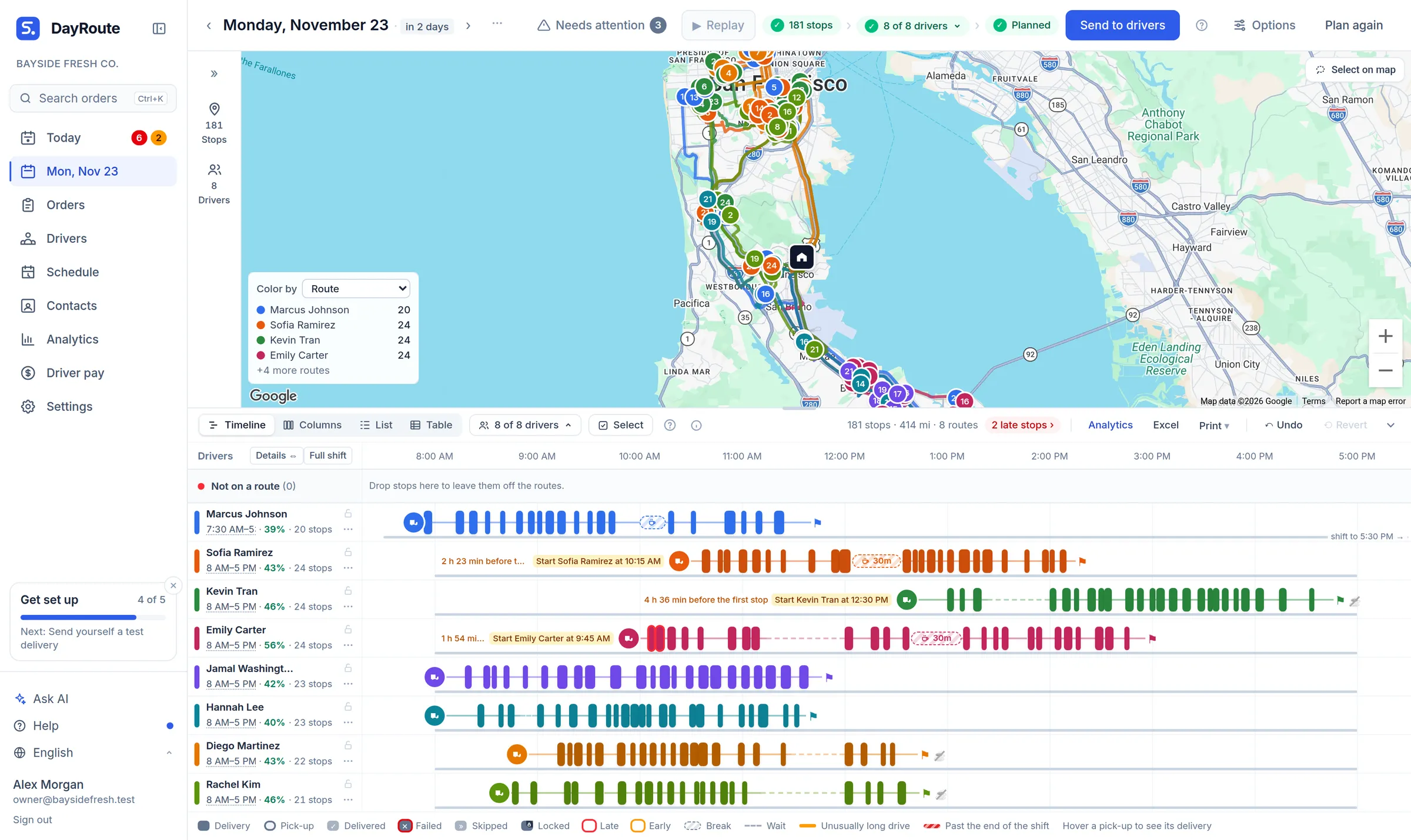
Use one of your own days, not the vendor’s sample. Import the orders from your spreadsheet, enter your drivers’ shifts and van limits, plan, and compare the result with the routes your team drove. The picture shows a whole planned day for every driver of the fictional demo company.
- Count the stops left out and read why: a tool that never leaves a stop out on a full day is lucky or is breaking a rule
- Change something mid-day: add three orders and take one driver away
- Send a route to your own phone and report a delivery with a photo and a signature
- Check what happens when the trial ends and how buying DayRoute works
Who it is for, and who it is not for
DayRoute fits local delivery businesses on scheduled routes with time windows and loads, from about 5 to 30 vehicles in one plan to about 120 drivers planned by area in several plans: scheduled couriers and food and beverage distributors, and also wholesale, bulky goods, and water and gas delivery. It is not fleet-management software (no telematics or maintenance), not a freight or TMS system and not an on-demand dispatch app. DayRoute starts with a free 1-month trial: every feature, 500 stops per plan, no credit card. After it, you buy the full system outright for $20,000, paid in 3 milestone installments, with your own logo and colors at no extra cost. Optional: a dev plan at $3,000 a month and basic support from $500 a month.
Try it in the live demo
A fictional delivery company in the middle of its day. Read-only, no sign-up.
Open the live demo →Feature
Route optimization
Optimize delivery routes for your whole fleet in seconds: time windows, capacity, shifts, breaks and skills, with every unassigned stop explained.
7 steps · 3 min read
Getting started: your first optimized routes in minutes
Frequently asked questions
What size of fleet is DayRoute for?
One plan works best for about 5 to 30 vehicles on scheduled routes, and there is no cap on drivers in a plan. Larger fleets, up to about 120 drivers, plan by area: several plans, one per area, each area run as its own company under one partner account.
How long is the free trial?
One month, no credit card, up to 500 stops per plan.
Do drivers have to install an app?
No. Drivers can use DayRoute Driver for Android and iPhone, or a text link that opens on any phone.
Is DayRoute fleet-management software?
No. It plans and runs delivery routes; it has no telematics or vehicle maintenance.
More answers
- How many delivery drivers do I need for my stops? A calculator
- How do I plan routes when a customer gives two delivery windows, such as morning or afternoon?
- How do I plan delivery routes for multiple drivers?
- How should a food and beverage distributor plan truck routes?
- Why was a stop left off my routes? Reading unassigned-stop reasons
Try it on one of your real days
Import your orders, plan every driver and send a route to your phone, on a 1-month free trial, no credit card.
Want a walkthrough with us? Book a demo