What route planning software respects van capacity and delivery windows?
Updated
Short answer
Look for software that checks every van’s load and every customer’s window for all drivers at once, and tells you in plain words why a stop did not fit instead of quietly breaking a rule. DayRoute checks capacity in packages, weight and volume on each driver and up to two delivery windows per order, and gives each stop it leaves out a reason with your own numbers, such as “Too much for any van: 12 packages, the largest (Ana’s) takes 10.”
Not the right tool if you load by pallet, floor space, item dimensions or temperature compartments: capacity is packages, weight and volume on each driver.
How it works in DayRoute
The rules it keeps, with the limits
DayRoute is route planning and delivery management software for local delivery teams, made by EzOps. It plans every driver of the day in one run and keeps each of these rules on each route.
| Rule | What you set | Limits |
|---|---|---|
| Capacity | What you set: Packages, weight (lb) and volume (ft³) on each driver, with a company default | Limits: Three measures; no item dimensions, pallets or compartments |
| Delivery windows | What you set: One or two windows per order, such as 9–11 AM or 2–4 PM | Limits: Two delivery windows and one pickup window per order |
| Time at the stop | What you set: Minutes per order, a company default, or learned from past visits to the address | Limits: 0–600 minutes per order through the API |
| Shifts and breaks | What you set: Each driver’s week schedule, split shifts and breaks | Limits: Two shift parts, up to 4 breaks per shift |
| Skills | What you set: Order types that must all be in the driver’s skills | Limits: Up to 30 skills per driver |
| Route limits | What you set: Most stops, hours and distance per route | Limits: 1–1,000 stops, 0.5–24 hours, about 1–3,100 miles (1–5,000 km) |
| Priorities | What you set: Normal, high or required | Limits: High is planned first when the day is full; required is never dropped for a cheaper plan |
Windows, and lateness by choice
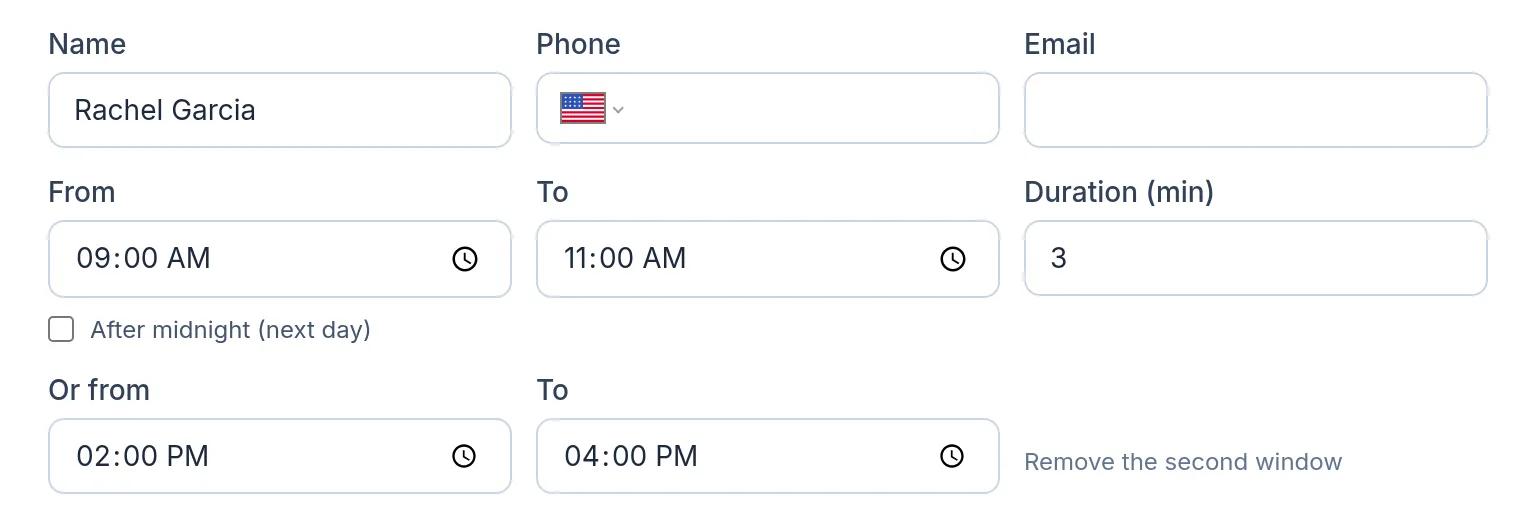
Each order takes one delivery window or two, such as 9–11 AM or 2–4 PM; a second window needs a first, and a pickup takes one window. Windows that run past midnight are handled. When the day is too full, you choose between leaving stops out and allowing lateness: arrive up to a set number of minutes after a window, or finish up to a set number of minutes after the day.
A reason for every stop that did not fit
A stop the plan leaves out gets a reason written with your own numbers, times and driver names, so you know whether to add a driver, a bigger vehicle, more hours or a wider window. These are texts the app shows:
- “Too much for any van: 12 packages, the largest (Ana’s) takes 10.”
- “Didn’t fit: the vans with room ran out of time (Ana); the others are full (Ben 10/10). Add a driver, a bigger vehicle or more hours.”
- “A driver can’t reach it within its time window (7:00 AM–7:10 AM) after starting work at 7:00 AM. Have a driver start earlier, or change its window.”
- “Didn’t fit: the drivers ran out of time, and higher-priority orders went first.”
Where it stops
Capacity has no item dimensions, no pallet or floor-space model and no compartments; a refrigerated body is a skill on the driver, not a separate compartment. There is no separate vehicle record: a vehicle’s limits sit on its driver. The API takes weight and volume in kg and m³, while the app shows lb and ft³ in the US. Try it on your own orders free for one month, no credit card.
Try it in the live demo
A fictional delivery company in the middle of its day. Read-only, no sign-up.
Open the live demo →Feature
Route optimization
Optimize delivery routes for your whole fleet in seconds: time windows, capacity, shifts, breaks and skills, with every unassigned stop explained.
13 steps · 6 min read
How to optimize routes and adjust them by hand
Frequently asked questions
Can a stop have two delivery windows?
Yes: one or two per order, such as 9–11 AM or 2–4 PM. A pickup takes one window.
Which capacity measures can I set?
Packages, weight and volume, on each driver, with a company default.
What happens to stops that do not fit?
They stay off the routes with a plain reason, or you allow some lateness instead.
Does it plan by pallets or compartments?
No. Capacity is packages, weight and volume; a refrigerated body is a skill on the driver.
More answers
- Can one route do both pickups and deliveries?
- How do I choose route planning software for a small delivery fleet?
- How many delivery drivers do I need for my stops? A calculator
- How do I plan routes when a customer gives two delivery windows, such as morning or afternoon?
- How do I plan delivery routes for multiple drivers?
Plan a full day with your own vans and windows
Capacity, delivery windows, shifts and a reason for every stop that does not fit, on a 1-month free trial, no credit card.
Want a walkthrough with us? Book a demo